The light on the Interface (DAQ) unit is off
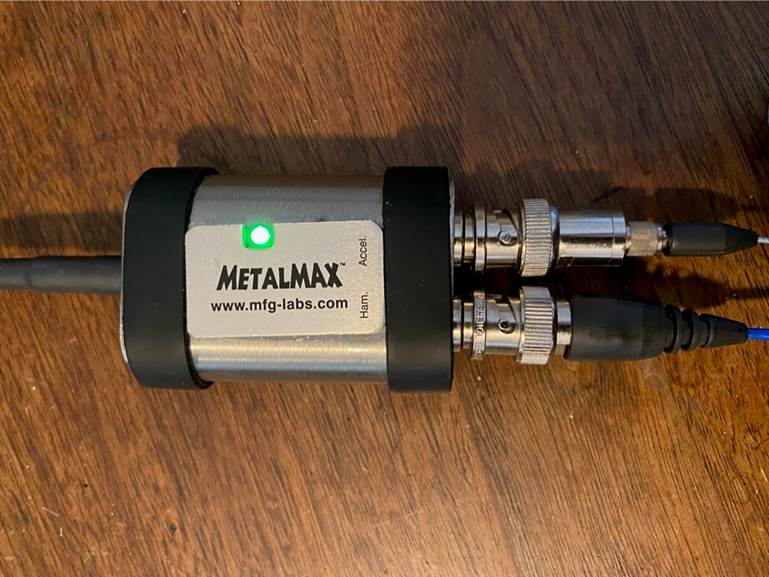
The
light on the DAQ unit is NOT a power lamp. It is an indicator of data
transmission. The light goes on and off depending on the ready state of
the unit. If the USB bus is active, if it is ready to sample or in the
process of sampling the light will be on. The light may go off after a period
of inactivity. If the light is off and you open MillMax, select a tool type and
the initialization begins, the light will come on. If it does not, then you may
have a defective USB port on your computer. Try another USB port to see if it
works there.
インターフェース(DAQ)ユニットのライトが消灯している
DAQユニットのライトはパワーランプではありません。データ伝送の指標です。ライトは、ユニットの準備状態に応じて点灯および消灯します。
USBバスがアクティブな場合、サンプリングの準備ができている場合、またはサンプリングの過程でライトが点灯します。しばらく操作しないと、ライトが消える場合があります。ライトが消灯しているときにMillMaxを開き、ツールタイプを選択すると初期化が開始され、ライトが点灯します。そうでない場合は、コンピューターのUSBポートに欠陥がある可能性があります。別のUSBポートを試して、そこで動作するかどうかを確認してください。
Die LED an der Schnittstelleneinheit
(DAQ) ist aus
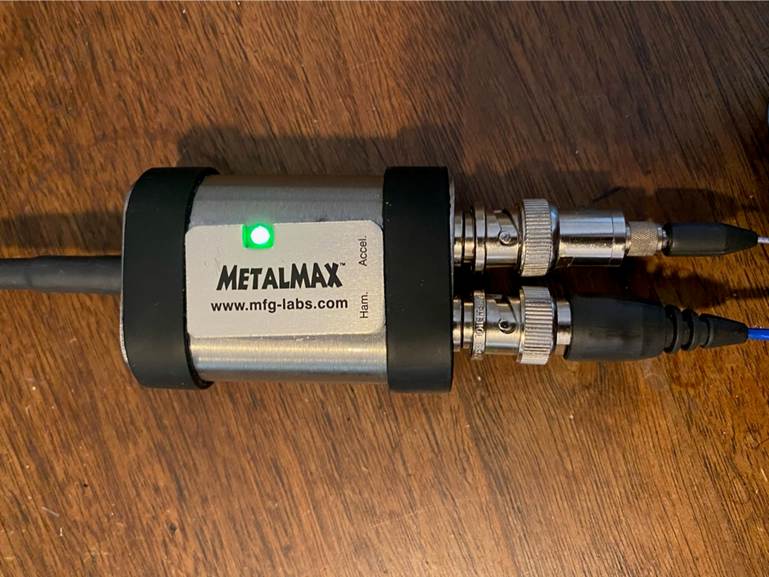
Das
Licht an der Datenerfassungseinheit ist KEINE Betriebslampe. Es ist ein Indikator
für die Datenübertragung. Das Licht geht je nach Bereitschaftszustand
des Geräts an und aus.
Wenn der USB-Bus aktiv ist,
wenn er zum Abtasten bereit ist oder gerade
abtastet, leuchtet das
Licht. Das Licht kann nach einer gewissen Zeit der Inaktivität erlöschen. Wenn die
LED aus ist und Sie MillMax
öffnen, einen Werkzeugtyp auswählen und die Initialisierung beginnt, leuchtet die LED auf. Wenn dies nicht
der Fall ist, haben Sie möglicherweise einen defekten USB-Anschluss an Ihrem
Computer. Versuchen Sie es mit
einem anderen
USB-Anschluss, um zu sehen,
ob er dort funktioniert.